Golf Outing Mode
Golf Outing mode is designed for single-day events like corporate outings, charity tournaments, and casual group rounds. Unlike a regular season league, an outing runs for exactly one day with one round of play.
How It Works
Choose "Golf Outing" when creating a new league. Set the outing date, course, and number of holes.
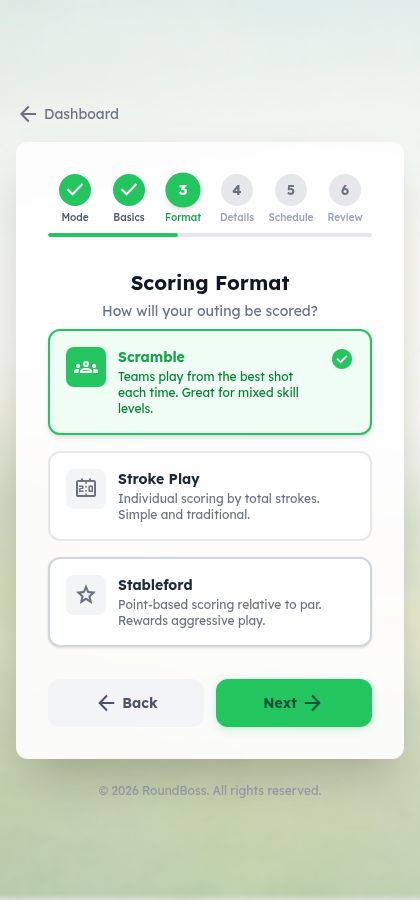
Select how scores are calculated: Scramble, Stroke, or Stableford.
Optionally turn on Closest to Pin, Longest Drive, and Skins.
Add participants manually or import via CSV.
Players (or the manager) enter scores. RoundBoss calculates results automatically.
Sub-Formats
Each outing uses one scoring sub-format:
Team scramble. Every golfer on the team hits, the team picks the best shot, and everyone plays from there, so the team records one score per hole. Teams ranked by net total (lowest wins). This is not Best Ball, where each golfer plays their own ball.
Individual stroke play. Each player enters their gross score per hole. Handicap strokes applied automatically. Ranked by net score (lowest wins).
Points awarded per hole based on net score vs. par (double bogey+ = 0, bogey = 1, par = 2, birdie = 3, eagle = 4, albatross+ = 5). Ranked by total points (highest wins).
Side Games
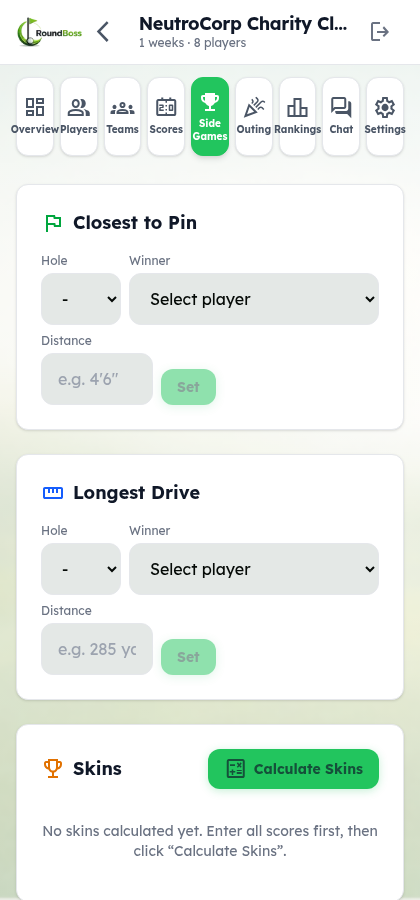
Outings support three optional hole-by-hole contests. Enable or disable each one in league settings.
Closest to Pin (CTP)
The manager records the closest-to-pin winner for designated holes. Enter the winning player and their distance (e.g., "4'6""). One winner per hole.
Longest Drive (LD)
Same as CTP but for longest drive. Enter the winning player and distance (e.g., "285 yds"). One winner per hole.
Skins
Lowest gross score on each hole wins the skin. If two or more players tie on a hole, the skin carries over to the next hole. The manager clicks "Calculate Skins" after all scores are submitted and RoundBoss determines winners automatically, including carryovers.
| Status | Meaning |
|---|---|
| Won | One player/team had the lowest score on that hole |
| Won + Carry | Winner also collected carried-over skins from previous holes |
| Carryover | Tied hole -- skin carries to the next hole |
| Push | Tied hole with no carryover |
Random Team Generation (Scramble)
For scramble outings, the manager can auto-generate random teams:
Go to Roster → Teams in your outing league.
Click Randomize to shuffle every active player into new teams at the outing's configured team size.
Randomize deletes all existing teams and replaces them with new random ones; it's blocked once any team round has been submitted.
Manager Setup
When creating a golf outing, the manager configures:
- Outing date -- The single day of play
- Sub-format -- Scramble, Stroke, or Stableford
- Side games -- Toggle CTP, Longest Drive, and Skins on or off
- Team size -- 2-4 players per team (scramble only), set in the league creation wizard
- Course and holes -- Standard course setup with par and handicap values
The Side Games tab appears in the manager view for entering CTP/LD winners and calculating skins results.
Player View
Players see their outing dashboard with:
- Team info (scramble) -- Team name and teammates
- Score entry -- Hole-by-hole gross scores
- Leaderboard -- Results in the selected sub-format
- Side game results -- CTP, LD, and skins winners (read-only)
Comparison to Season Leagues
| Feature | Season League | Golf Outing |
|---|---|---|
| Duration | Multi-week season | Single day (1 round) |
| Formats | Match Play, Stroke, Stableford, Scramble, Team Match Play | Scramble, Stroke, or Stableford |
| Side games | Skins and low net only | Closest to Pin, Longest Drive, and Skins |
| Teams | Fixed for the season | Random generation available |
| Matchups | Weekly auto-generated pairings | N/A (single round) |
| Play the Card | Available | N/A |